
Most explanations of disposable email detection stop at "we check it against a list." That is roughly a tenth of the story, and it is the part that decays fastest.
A burner domain that launched this morning is not on anyone's list. A temp mail service running 400 rotating aliases is on maybe six of them. A user who signed up through Apple's Hide My Email is not disposable at all, but plenty of systems flag them anyway and quietly reject a paying customer.
This is a walk through the actual mechanics: every layer a detection system runs, what each one catches and misses, how the domain databases stay current, and where the whole thing still gets fooled.
The problem in one paragraph
A disposable address is syntactically valid, has working MX records, and accepts mail. It passes every check that a naive validator runs. The only thing separating it from a real address is who controls the inbox and how long it survives, and neither of those facts is visible in the address itself.
So detection is inference. You gather signals about the domain, the mail infrastructure behind it, and the shape of the address, then combine them into a probability. There is no single field that answers the question.
Layer 1: Syntax and structure
The cheapest check, and the one that catches the least.
RFC 5322 defines what a valid address looks like, and the real specification is wider than most people expect. Quoted local parts, plus addressing, and IP literals in the domain position are all legal. A validator that is too strict rejects real addresses, which is why hand-rolled regex is usually worse than no check at all.
Practical syntax checks that matter:
Exactly one unquoted @
Local part length under 64 characters, total under 254
No consecutive dots, no leading or trailing dot in the local part
Domain has at least one dot and no invalid characters
This filters typos and malformed input. It does nothing for disposables, because burner services generate perfectly valid addresses.
Layer 2: TLD validation
The domain extension is checked against the IANA root zone, which currently lists over 1,400 valid top level domains.
user@startup.qwerty   → invalid TLD, no such extension exists
user@startup.xyz      → valid TLD, .xyz is real
This catches malformed domains and a specific class of lazy fake input. It also produces one of the most common false positive patterns in the wild, because people assume anything outside .com, .net, and .org is suspicious. Newer extensions like .io, .dev, .app, and .ai are used by real companies constantly, and blocking by extension is a fast way to reject your own market.
Some extensions do carry elevated risk, because they are cheap or free to register and attract abuse in volume. That is a reason to weight them slightly in a score, not to block them.
Layer 3: Domain matching
This is the layer everyone knows about. The address domain is matched against a known set of disposable providers.
The naive version is a flat list of domain strings with an exact match lookup. It works for mailinator.com and fails for everything designed to evade it. Real implementations handle several complications:
Subdomain services: Some providers hand out addresses on subdomains, so matching has to walk up the domain tree rather than compare the full string. anything.mailinator.com needs to resolve to the same verdict as the parent.
Alias domains: A single service commonly operates hundreds of unrelated looking domains that all deliver to the same infrastructure. Mailinator, YOPmail, and Temp Mail each run large alias pools specifically so that blocking one domain accomplishes nothing.
Wildcards and patterns: Some operators register domains in obvious sequences, and pattern rules catch families of them at once.
LeadCop maintains a database of more than 200,000 disposable domains, updated daily. Volume is the point. The long tail of small and short lived burner services is where most modern evasion happens, and a list that only knows the famous names catches a fraction of live traffic.
Layer 4: DNS and MX records
Every domain that receives mail publishes MX records pointing at the servers that accept it.
dig MX mailinator.com +short
# 10 mail2.mailinator.com.
Two separate uses here, and they are worth keeping distinct.
As a validity check: A domain with no MX records cannot receive mail. Anything sent there hard bounces. This is a clean fail with almost no false positive risk, and it catches dead domains and typo'd domains that happen to exist.
As a fingerprint: This is the more interesting one. Hundreds of unrelated burner domains frequently point their MX records at the same small set of mail servers, because they are all fronts for one operator running one backend. Clustering domains by MX host lets a detection system identify a brand new burner domain it has never seen, purely because its mail infrastructure matches a known temp mail operator.
MX fingerprinting is how the good systems catch domains registered yesterday. The domain is unknown, but the plumbing behind it is not.
Layer 5: SMTP probing
You can open a connection to the mail server and ask whether a mailbox exists, without sending anything:
> HELO verifier.example.com
> MAIL FROM: <probe@verifier.example.com>
> RCPT TO: <target@domain.com>
< 250 OK (mailbox accepted)
< 550 No such user (mailbox rejected)
The connection is closed before DATA, so no message is ever delivered.
In theory this is the definitive check. In practice it is the least reliable layer, for reasons worth knowing:
Catch-all domains accept everything: A 250 OK from a catch-all tells you nothing about whether the mailbox is real.
Greylisting delays the answer: Many servers temporarily reject unknown senders on first contact, so a single probe returns an ambiguous result.
Major providers refuse to answer: Gmail and Outlook deliberately return the same response for real and fake mailboxes to prevent enumeration.
Probing costs sender reputation: Repeated verification traffic from one IP gets that IP blocked, which is why doing this yourself at volume tends to backfire.
It is slow: An SMTP handshake takes hundreds of milliseconds to seconds, which is too slow to sit in front of a form submission.
Production systems run SMTP checks asynchronously or from reputation-managed infrastructure, and treat the result as one signal among many rather than a verdict.
Layer 6: Catch-all detection
A related trick. Probe a mailbox that certainly does not exist:
zx91qp7f4h@domain.com → 250 OKIf a random string is accepted, the domain accepts everything. Burner services are catch-all by definition, because the whole product is that you invent an address on the spot and it works.
Plenty of legitimate companies also run catch-all domains, so this is a supporting signal rather than a decision. Combined with a young domain and a gibberish local part, it becomes fairly convincing.
Layer 7: Domain intelligence
Facts about the domain itself, gathered outside the mail system.
Registration age: WHOIS exposes the creation date. Burner domains are cheap and disposable, so they skew young. A domain registered eleven days ago submitting signups to your form is worth a closer look. Privacy shields hide the registrant on most domains now, so the date is often the only usable field.
Registrar and nameserver patterns: Bulk registered abuse domains cluster around specific cheap registrars and share nameserver configurations.
Hosting and IP neighborhood: Domains sharing an IP with known burner services are usually related.
Web presence: A burner service homepage advertises itself, typically with a generated address and a live inbox pane. A parked page or a total absence of content is also informative, though small legitimate businesses look similar.
None of these is decisive alone. Stacked, they separate "a company I have not heard of" from "a domain registered last week on a bulk registrar with a catch-all mail server shared by 300 other domains."
Layer 8: Local part heuristics
The part before the @ carries information that the domain check misses entirely, and it is the only layer that catches junk signups on Gmail.
Entropy and character distribution: Random strings have a different letter frequency profile than names. qk7zvxn2 does not look like anything a person would choose.
Keyboard walks: asdfghjk, qwerty123, zxcvbn. Extremely common in throwaway registrations.
Placeholder words: test, temp, asdf, noreply, nobody, fake, and numbered variants.
Repetition: aaaaa, abcabc, long digit runs appended to a short stem.
This layer needs a light hand. Real people have short names, real people use initials and numbers, and some languages produce local parts that look high-entropy to an English-tuned model. It belongs in the score with modest weight.
Layer 9: Typo detection
Different problem, same pipeline, and the only layer that gains you signups instead of removing them.
The domain is compared against a list of high-volume providers using edit distance, usually Damerau-Levenshtein, which counts insertions, deletions, substitutions, and transpositions. A domain that is one or two edits from gmail.com and is not itself a known valid domain is almost certainly a mistake:
gmial.com   → 1 transposition from gmail.com
gmai.com    → 1 deletion
hotmial.com → 1 transposition from hotmail.com
yahooo.com  → 1 insertion
The right response is a suggestion, not a block. didYouMean in the LeadCop response returns the corrected domain so you can offer a one-click fix under the field. A user who mistyped their address is a real lead you would otherwise lose without ever knowing.
Layer 10: Alias normalization and role detection
Alias normalization matters for anyone offering trials or free tiers. Gmail ignores dots and everything after a +, so all of these deliver to one inbox:
john@gmail.com
j.o.h.n@gmail.com
john+trial7@gmail.com
Normalizing before a duplicate check catches serial signups without asking the user for anything. Other providers use different conventions, so this has to be provider-aware rather than applied globally.
Role detection matches the local part against shared mailbox patterns like info@, admin@, support@, sales@, billing@. These are not fake. They are real addresses read by rotating groups of people, and they convert differently, which makes them worth flagging and routing rather than blocking.
Putting it together: scoring
No single layer is trustworthy alone. Detection systems combine them into a composite, which is what reputationScore represents in the LeadCop response: a 0 to 100 quality number where higher is safer, alongside a riskLevel band and a reasons array explaining what drove it.
Here is a full response:
{
  "isDisposable": true,
  "domain": "mailinator.com",
  "reputationScore": 40,
  "riskLevel": "Poor",
  "tags": ["disposable"],
  "reasons": ["Disposable email provider detected"],
  "isValidSyntax": true,
  "isRoleAccount": false,
  "isFreeEmail": false,
  "isInvalidTld": false,
  "didYouMean": null,
  "mxValid": true,
  "smtpValid": true,
  "requestsRemaining": 999
}
Note that isValidSyntax, mxValid, and smtpValid are all true. Every basic check passes. Only the domain intelligence layer catches this one, which is the entire argument for running more than one layer.
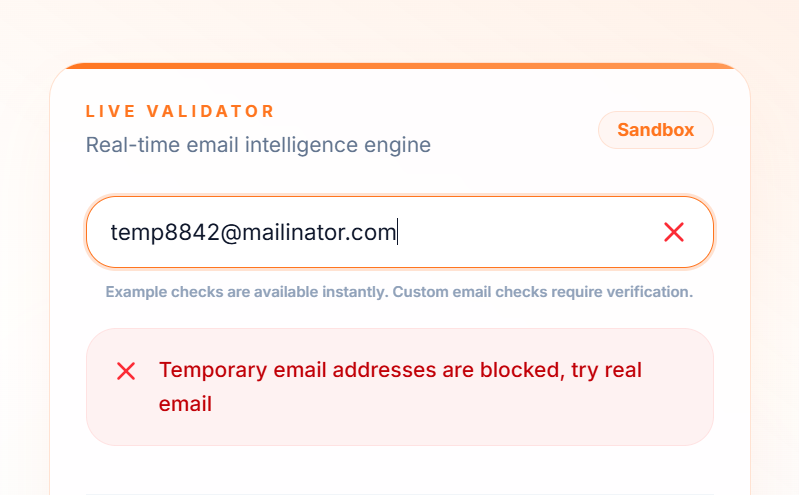
You can test the behavior yourself on the LeadCop homepage using the preset examples for disposable, gibberish, role, typo, and real addresses.
Why the databases decay, and how they stay current
A disposable domain list is a perishable asset. New burner services launch daily, existing ones rotate alias domains specifically to defeat blocklists, and any static list starts leaking within weeks.
Keeping one current means running several collection methods at once:
Honeypot registration: Sign up to burner services and record the domains they hand out. This catches alias pools directly from the source.
Crawling: Monitor temp mail sites for the domain selectors they expose to users.
Newly registered domain feeds: Watch new registrations for patterns matching known abuse signatures.
MX clustering: The strongest method. When a new domain appears with mail infrastructure matching a known burner operator, it can be classified before anyone has ever used it against a real form.
Traffic feedback: Addresses that bounce, never activate, or correlate with abuse across a network of protected sites feed back into classification.
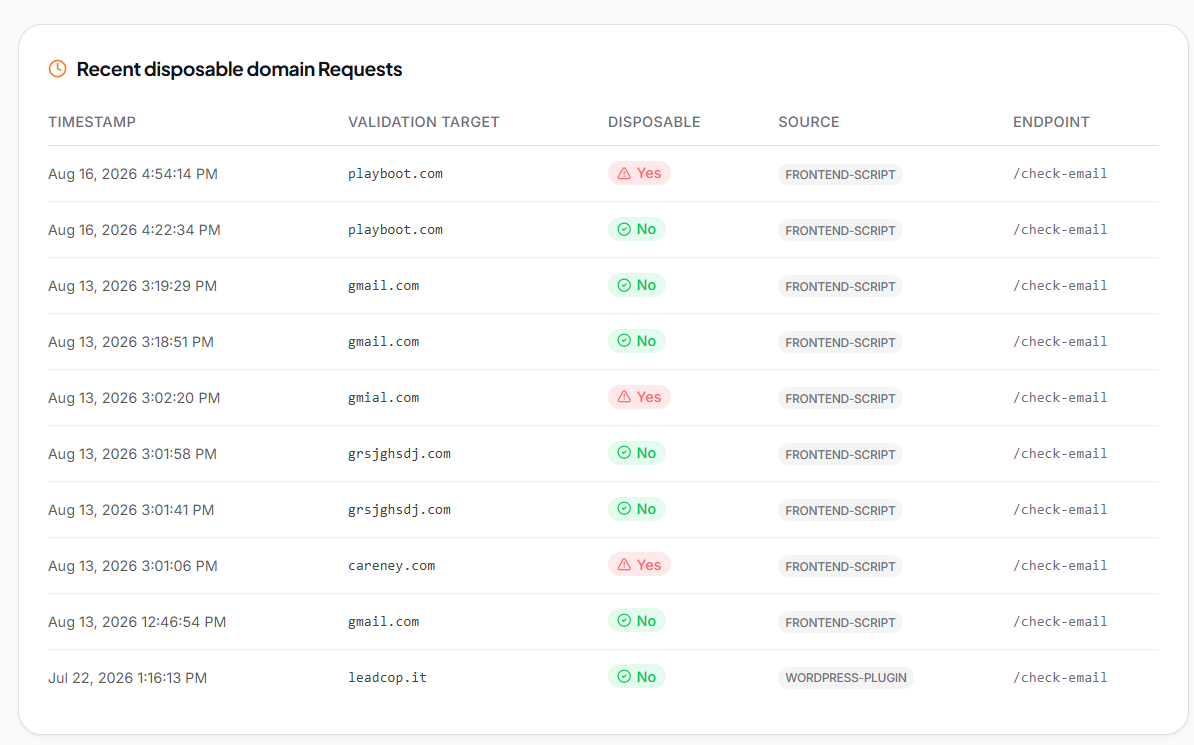
LeadCop's domain database updates daily on this basis, which is the practical difference between a maintained service and pulling a blocklist from GitHub once and forgetting about it.
Where detection still fails
Honesty about the limits is more useful than a claim of perfection.
Custom domain burners: Several temp mail services let paying users bring their own domain. That domain is new, unknown, and has no history. MX fingerprinting is the only layer with a chance, and only if the operator reuses infrastructure.
Private relay services: Apple's Hide My Email, Firefox Relay, and DuckDuckGo's email protection generate an alias that forwards to a real, permanent inbox. These are not disposable in any meaningful sense. The person is real and reachable. Systems that classify them as burners reject genuine customers, and the volume of relay use is rising, so this is an increasingly expensive mistake.
Self-hosted burners: Anyone with a domain and thirty minutes can run their own catch-all. Low volume, essentially undetectable by domain reputation.
Fresh alias domains: There is always a window between a domain going live and any system classifying it.
The honest framing is that detection removes the overwhelming majority of automated and casual abuse at essentially zero cost to real users. It does not stop a determined individual, and no system that leaves your form usable will.
The latency question
All of this has to return before a user finishes typing, which rules out doing it in sequence.
Fast implementations keep the domain database in memory rather than querying it, cache DNS lookups aggressively since MX records rarely change, run independent checks in parallel, and keep the slow layers, SMTP probing in particular, off the request path entirely. LeadCop's average decision time is under 100ms on that basis.
One design rule matters more than speed: fail open. If the check cannot complete, the signup goes through. Blocking a real customer because a validation service had a bad thirty seconds is a worse outcome than admitting a handful of burners. LeadCop's script and plugins fail open by design, and API 500s are safe to retry.
FAQ
Is anything sent to the address during a check?
No. Domain reputation, MX records, TLD validation, and pattern checks all happen without contacting the mailbox. SMTP probing, where used, closes the connection before any message data is sent.
Why not just use a free blocklist from GitHub?
Fine for a side project. It decays within weeks, misses alias domains entirely, has no MX fingerprinting, and some lists contain legitimate domains reported in error, so you start blocking real customers without a way to know.
Is a disposable address the same as an invalid one?
No. It is valid and deliverable right now. It just will not exist next month and nobody is reading it.
Can I run these checks myself?
Individually, yes, and the earlier sections show how. The difficulty is not the checks, it is maintaining a current domain database and the MX intelligence behind it, which is continuous work rather than a build.
How accurate is detection in practice?
High on automated and casual abuse, which is nearly all of the volume. Weaker on custom domain burners and self-hosted setups, which are rare.
Trying it on your own traffic
The layers above are more convincing against your real signup data than in the abstract. Put validation on your highest volume form, leave it in flag-only mode for a week, and read the reasons field on what it catches. That tells you which layer is doing the work on your specific traffic, which is rarely the one people expect.
You can start free with no card, and the docs cover the endpoint, the response fields, and setup for WordPress, Shopify, Webflow, Framer, Wix, and React.